Documentation
- Administrator
Products, orders, and payments
Commerce
eMedhaa ties course products, checkout, and subscriptions to the same student accounts you manage in People. Administrators use All orders for finance and support; students use Products, the cart, and checkout on the public site or portal.
Payment methods (for example Paytm, PayPal, or other gateways your institute enables) depend on plugins and merchant credentials on the server. Your technical partner configures providers; administrators confirm checkout with a test purchase before marketing paid batches.
Where administrators work
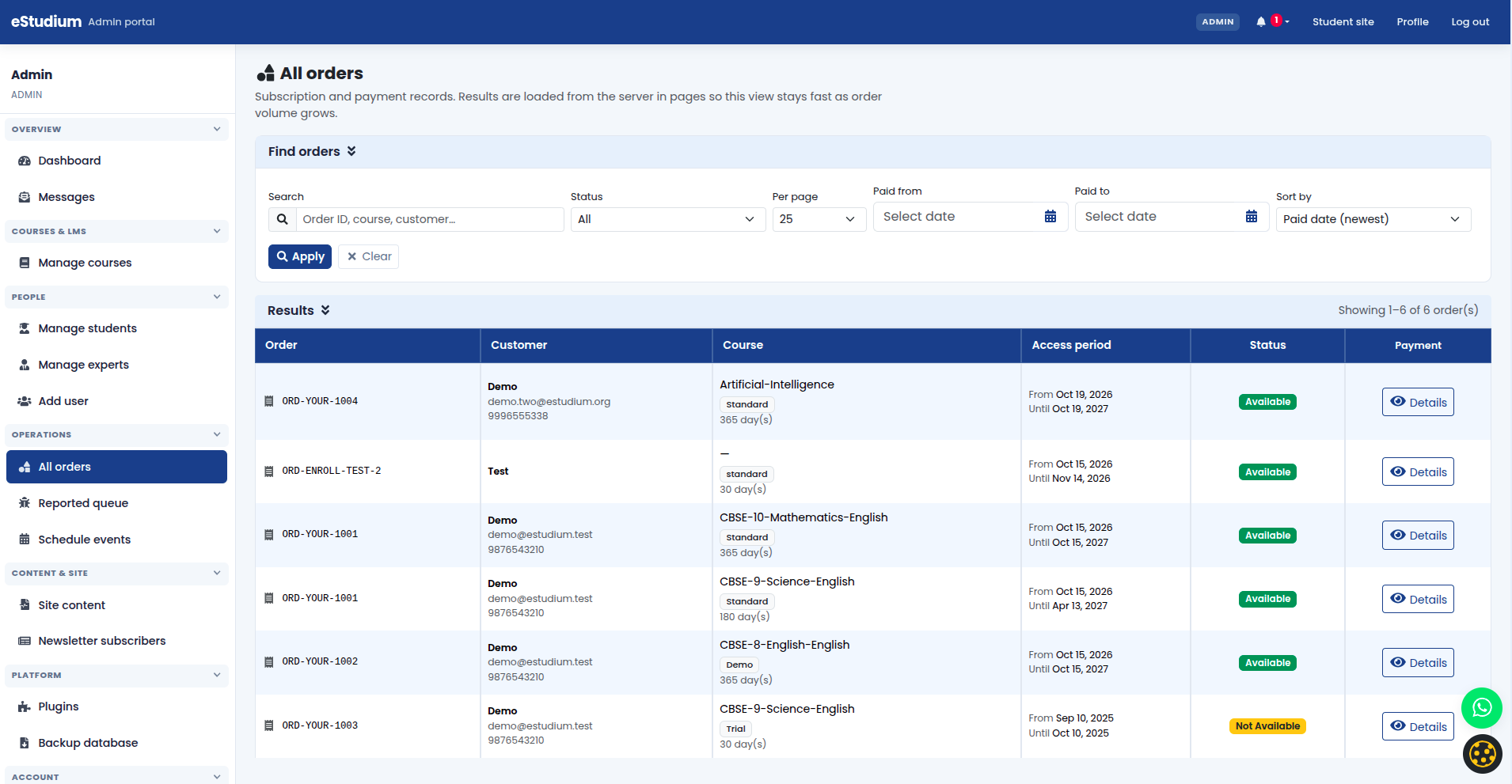
- All orders (Operations or Commerce in the admin sidebar, labels vary by theme): list of transactions with amounts, status, and linked students. Use this for reconciliation, refunds questions, and support tickets.
- Course catalogue / LMS: courses are sellable or assignable products with pricing tiers; publication status controls whether they appear on Products.
- Plugins: payment provider modules must be enabled before checkout appears (see Plugins).
Student purchase flow
- Student browses Products (or course listing on your site).
- They add a course to the cart or start checkout for a free offering.
- Checkout collects payment when the course is paid; successful payment creates a subscription linked to the student account.
- My courses and the dashboard show active subscriptions and renewal-related dates where your deployment supports them.
Free or demo courses may skip payment while still creating a subscription through manual or bulk enrollment paths.
Payment setup (technical vs admin)
Technical team typically:
- Registers merchant accounts with the payment provider.
- Stores API keys and webhook secrets in server configuration.
- Enables the matching payment plugin and redeploys if required.
Administrators typically:
- Confirm the Plugins screen shows payment modules enabled.
- Run at least one test checkout in a staging or low-value live transaction.
- Align Privacy policy and checkout copy with how you process payments.
Do not share merchant secrets in tickets or documentation; reference your institute’s secure credential store.
Before you advertise paid courses
- At least one course is published with correct pricing.
- Checkout completes end-to-end for your chosen provider.
- Refund and terms pages match your institute policy (Site content legal pages).
- Support staff know how to look up a student in All orders by email or order id.
Configure and verify payments
- Open Plugins with your technical contact and confirm payment providers are enabled for this environment.
- Publish or update the target course product and pricing.
- As a test student (or incognito browser), add the course to the cart and complete checkout using a real or sandbox payment method per provider rules.
- Confirm the new row appears in All orders with expected amount and status.
- Open the test student account and confirm My courses shows the subscription.
- Only then promote paid admission on the website, ads, or email.
Reconcile orders and support
Use All orders when a student claims payment succeeded but access is missing:
- Match email and transaction time to the order row.
- Check order status (pending, completed, failed) before re-enrolling manually.
- For duplicate charges, follow your institute refund process; manual enrollment may still be needed if payment webhooks were delayed.
Export or reporting details depend on your deployment; ask your hosting partner if you need automated feeds to accounting tools.
After go-live
- Spot-check new orders daily during admission peaks.
- Keep a short internal runbook: who checks All orders, who can grant manual access, who contacts the payment provider.
- Review failed checkouts in provider dashboards as well as in eMedhaa when troubleshooting.
What you gain
- One system for learning access and commercial records
- Faster support when orders link directly to student accounts
- Clear handoff between marketing (Products) and operations (All orders)
Troubleshooting
| Checkout button missing | Payment plugin disabled; course not published; student not logged in when required |
|---|---|
| Payment succeeded, no course access | Order status in All orders; subscription on student; webhook or delay (technical team) |
| Wrong amount charged | Course pricing tier; currency settings; cart contents before pay |
| Test works, live fails | Live vs sandbox credentials; merchant account activation |
| Order not listed | Wrong institute environment; student used different email than order |
See also
You finished Commerce
Continue to Communication →